What your sessions are telling you
5 min read
The Director is not a list of what you are running. It is an answer to one question - is anything waiting on me - and everything else on it is secondary.
Five minutes. You need DevThrottle open with at least one session in the Director; it reads the same with one as with twenty.
Read the top line first
Above the session list is a count, and it says how many sessions need you. It is hidden when that number is zero, so you never read a zero - the count is either there or it is not.
Read it as these are waiting for you to type something, not as everything is fine. Two things it deliberately leaves out. An agent that crashed is not counted - the Director shows that state on the card but keeps it out of this number. And a session the Gateway has not reported on yet is not counted either, because the count takes the quiet option until it hears something rather than nagging you about a session it cannot see.
So no count means no session is currently reported as needing you. It is not a statement about what your agents are actually doing. The squares below are what tell you that.
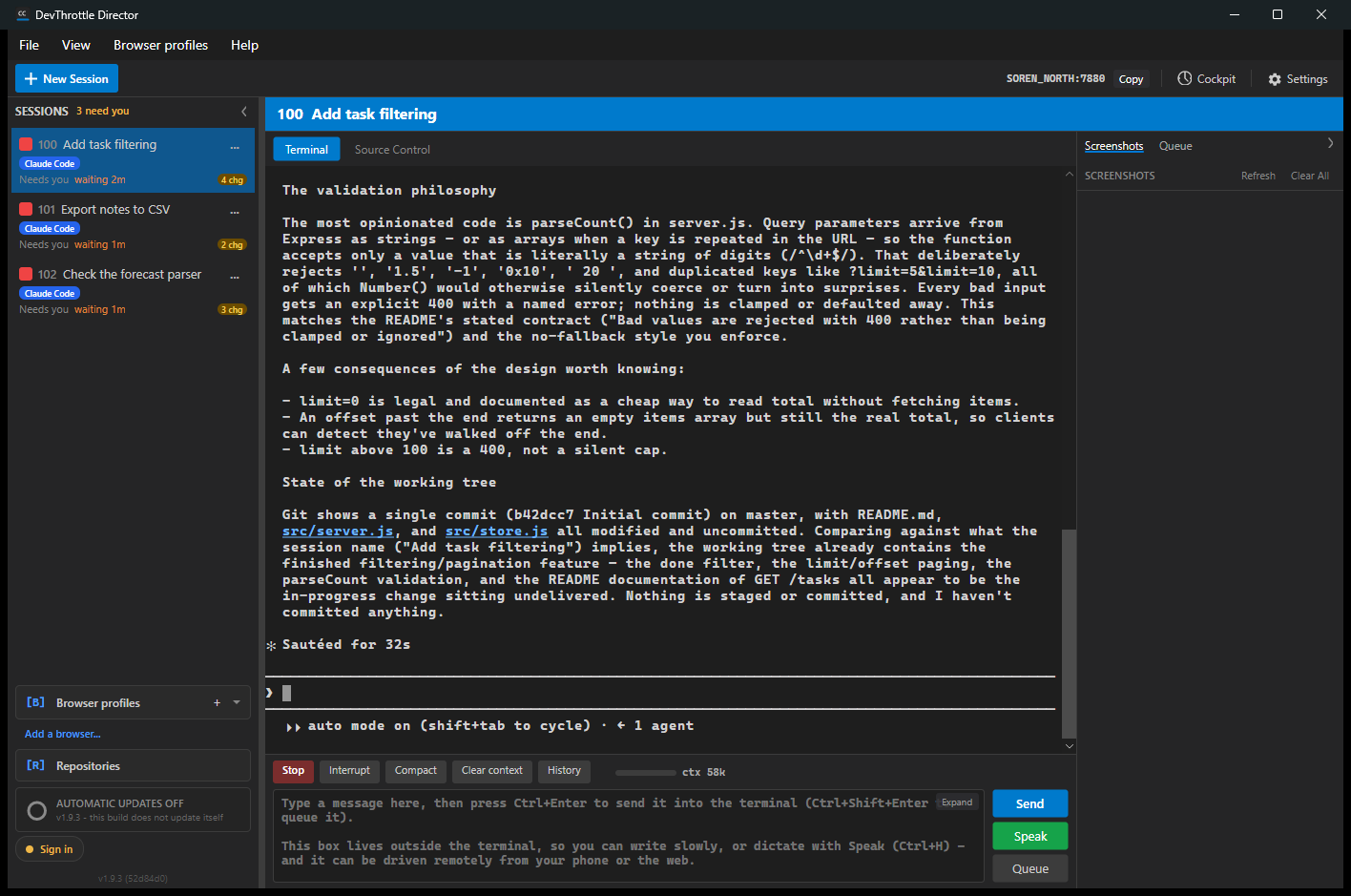
The DevThrottle Director window: a session list on the left showing three sessions that need you, each with a red square, a waiting time and a yellow changes badge, the selected session's terminal filling the centre with the agent's output, and the action bar with Stop, Interrupt, Compact, Clear context and History above the prompt box with Send, Speak and Queue Read the colour, not the words
Each card carries a coloured square. Red means stopped and waiting for a human - that agent has done all it can without you. For what every other colour means, see Session cards and states.
Scan the squares down the left edge. That is the whole Director in one movement, and it is why colour is on the outside where nothing else competes with it.
Read the waiting time, not the started time
A waiting card shows how long it has been waiting. That is the number that matters, because it is how much of your day this agent has already lost. A session that started three hours ago and has been waiting two minutes is fine. One that started ten minutes ago and has been waiting nine is not.
When several are red, deal with the longest wait first.
Notice the badge nobody finds
A small yellow badge on a card - 4 chg - counts the uncommitted file changes in that session's repository. It is the quietest useful thing here: it tells you there is real work sitting in that repository, waiting to be reviewed or lost.
Look for it now in your own Director. Most people run DevThrottle for weeks without noticing it.
Then, and only then, open one
Click the card with the longest wait, and select the Terminal tab if another tab is showing. Read what the agent actually printed, deal with what is there, and go back to the squares.
Before you walk away, look for dark red
A crashed agent will not come and find you. It is not red, so it never reaches the count at the top, and it has no waiting time - the process has already ended. Its card shows dark red and the word Crashed, so scan for it deliberately before you decide the Director is quiet.
Next
For every state, badge and card menu in detail, see Session cards and states. For the moves that manage a session after it starts, see session lifecycle. To see the same picture for every machine at once, see The fleet map.