Workflows: the rules your fleet works by
5 min read
A workflow is a named way of working that your whole fleet shares. Not a script and not automation - it is written guidance about how a kind of job should be run, stored on your Gateway. Every session on every machine starts with the catalog in its briefing - each workflow's name and a one-line summary - and a session that takes on matching work fetches the full conduct from there. A session spawned into a run is pointed at the conduct directly, at the run's pinned version.
It exists because the alternative is retyping the same expectations into every session and getting slightly different behaviour each time.
The catalog
Open Workflows in the Cockpit. Each row is one workflow: its name, whether it is currently in force, which version is live, and when it last changed.
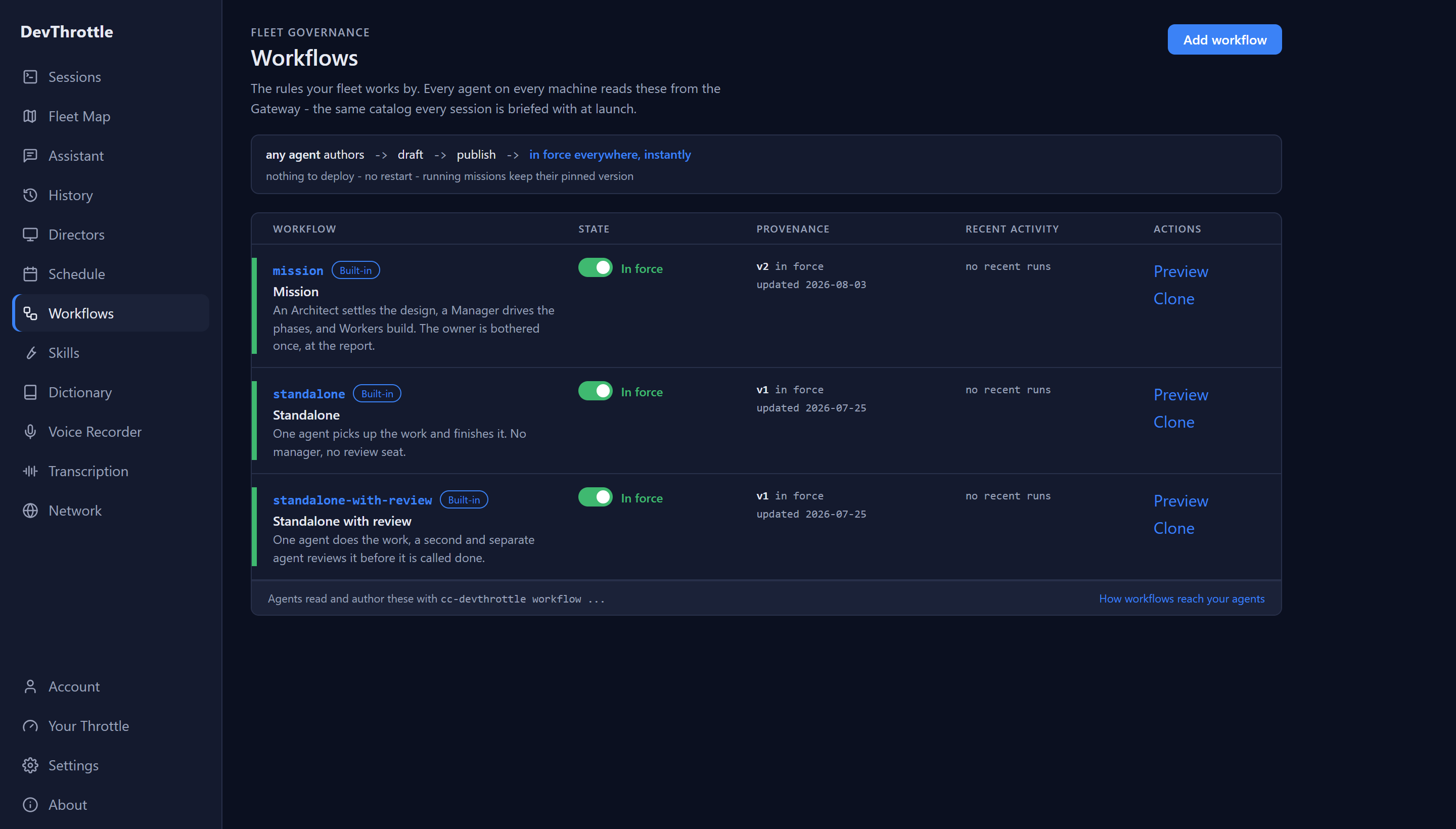
DevThrottle ships with three built-in workflows:
- Mission - the Team way of working, shipped in the catalog under the name mission: an Architect settles the design, a Manager drives the phases, and Workers build. You are bothered once, at the report.
- Standalone - one agent picks up the work and finishes it. No manager, no reviewer.
- Standalone with review - one agent does the work, and a second, separate agent reviews it before it is called done.
How a change reaches your fleet
Any session can author a workflow. It is pushed as a draft, and publishing makes it the live version at once - there is nothing to deploy and nothing to restart. The one delay is at the edge: each Director re-reads the catalog on a poll about every minute, so a session started in the first moments after a publish can still be briefed with the old catalog. Reading the catalog directly with the commands below is never behind - they ask the Gateway live.
Reading and authoring from the command line
The Cockpit is one window onto the catalog; the command line is the other, and it is the one your sessions use.
cc-devthrottle workflow list             # every workflow the fleet can run
cc-devthrottle workflow show <id>        # metadata, steps, outcome criteria
cc-devthrottle workflow instructions <id>  # the raw conduct, to be followed
cc-devthrottle workflow versions <id>    # version history, newest first
instructions is the one a session actually calls: it prints the workflow's guidance so the session can follow it as its conduct for that job.
cc-devthrottle workflow pull <id> --dir <dir>   # workflow.json + instructions.md + helpers/
cc-devthrottle workflow push <id> --dir <dir>   # upload as a draft (creates it if new)
cc-devthrottle workflow publish <id>            # the draft becomes the live version
cc-devthrottle workflow clone <id> <new-id>     # copy one into a new workflow you own
The id on push is the workflow being written, and it must agree with the id declared inside the directory's workflow.json - a push whose two ids disagree is refused. So to make your own version of an existing workflow, pull it, change the id in workflow.json, and push to the new id - or clone it, which does that in one command and publishes the copy immediately, with no draft stage.
Built-ins are read-only
The three built-in workflows cannot be edited: a push aimed at a built-in id is refused, so they never diverge from what DevThrottle ships, and they update with the Gateway itself. They can never be deleted either - deleting only archives a custom workflow, and its version history stays. To customize a built-in, clone it (or pull it into a new id) and change your copy.
Turning one off
A workflow can be switched off without being deleted. disable hides it from every session's briefing, stops new runs, and stops sessions from joining runs already underway; nothing is removed, and enable puts it back.
Runs
Each execution of a workflow is a run. runs lists them newest first, and run shows one in detail: the version it was pinned to, its lifecycle, its acceptance criteria, who took part, and the proof it produced.
Where to go next
For a walk-through of writing your first one, see Workflows: your named ways of working. For the roles a mission workflow staffs, see Session roles and missions. For the rest of the command line, see the command reference.