Your dictation dictionary
2 min read
Speech-to-text is only as good as its grasp of your vocabulary - project names, tool names, jargon. DevThrottle keeps one shared dictionary on your Gateway, and a cleanup pass applies it to transcriptions after the text comes back. That covers every voice surface - dictation and Speak on every Director, and voice-note transcription - on DevThrottle's hosted Gateway and on a Gateway you host yourself alike: teach it a term once and the next transcription is corrected, with no restarts and no copying files around.
The Dictionary page
Open Dictionary in the Cockpit's left rail. It has two lists:
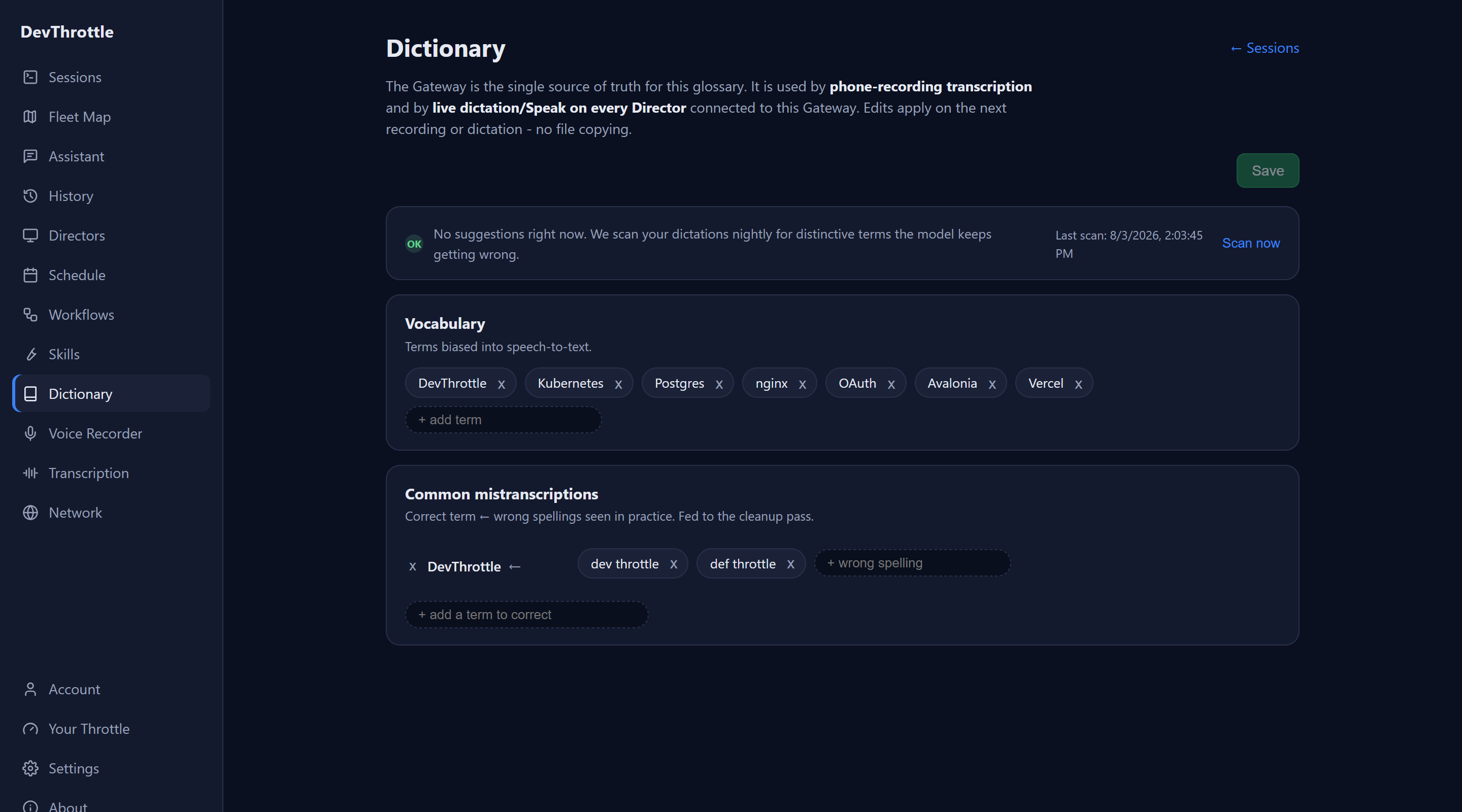
- Vocabulary - your canonical spellings: the way you want your terms written. The terms are not sent to the speech model itself - correction happens on the text, inside your Gateway, after it comes back.
- Common mistranscriptions - the correct term paired with the wrong spellings you have actually seen. This is the list that does the work: a wrong spelling written here is corrected every time it appears, exactly.
Edit, then Save. The dictionary is read fresh each time it is used, so a saved edit applies to the next transcription that reads it - the next voice note recording, and the next time you dictate. If you try to leave with unsaved changes, the page stops you and asks.
What the cleanup pass will and will not do
As DevThrottle ships, the cleanup pass never rewrites your text freely. Every change is a find-and-replace of a wrong spelling you wrote down, and the word put in its place is one of your own - a Vocabulary term, or the correct spelling from a Common mistranscriptions row. Nothing else in what you said is changed: a word that merely resembles one of your terms is left exactly as you said it, and a transcript with none of your listed spellings in it comes back untouched. If a correction pass fails part-way, the raw transcript is delivered instead.
One setting widens that, and it is off unless somebody writes it into the dictionary your Gateway reads. Turned on, the pass may also correct a word that is close to one of your terms but that you never listed. It is not a control on the Dictionary page, so nothing you do there switches it on.
A dictionary the Gateway cannot read does not fail the transcription: the raw text comes through with none of your corrections applied. So if your terms suddenly stop being fixed after a hand edit to the dictionary file, the dictionary is the first place to look.
Suggestions from your own dictations
You do not have to think of every term yourself. The Gateway scans your recent dictations for distinctive words the speech model keeps getting wrong, screens out ordinary English, and offers what is left at the top of the Dictionary page. The scan runs nightly; Scan now runs one on the spot, and the panel shows when the last one ran. While there are terms waiting, the Dictionary item in the left rail carries a red count, so you can see there is something to look at without opening the page.
Each suggestion is a row: the term, the wrong spellings it was actually heard as, and a count of how many times out of how many it came out wrong. Rows arrive ticked. Untick the ones you do not want this round, press Add, and the term and its wrong spellings are written into your two lists. Nothing changes until you press Add.
Dismiss on a row stops that term being suggested again; the dismissed ones sit in a collapsed Dismissed suggestions list and can be restored from there. If the screening step cannot be reached when a scan runs, the page says so and holds back the new candidates rather than showing unscreened guesses.