What did I actually get done this week?
5 min read
Agents work while you are elsewhere, which is the point of them - and it makes Friday afternoon strange. Plenty happened, and almost none of it happened in front of you. This is how to find out what your fleet actually did.
Five minutes, and worth making a habit rather than a one-off. You need a Gateway and some history to look at.
Open History and widen the window
In the Cockpit, choose History. It opens on a short window; switch it to Week. The line beside the buttons is the first real answer - how many sessions ran, across how many repositories.
That number is usually higher than people expect, which is the whole reason to look.
Read it by repository, not by session
The page groups work under the repository it happened in, and then by day. That grouping is deliberate and it is the useful one: it answers "where did my week go" rather than "what was session 101".
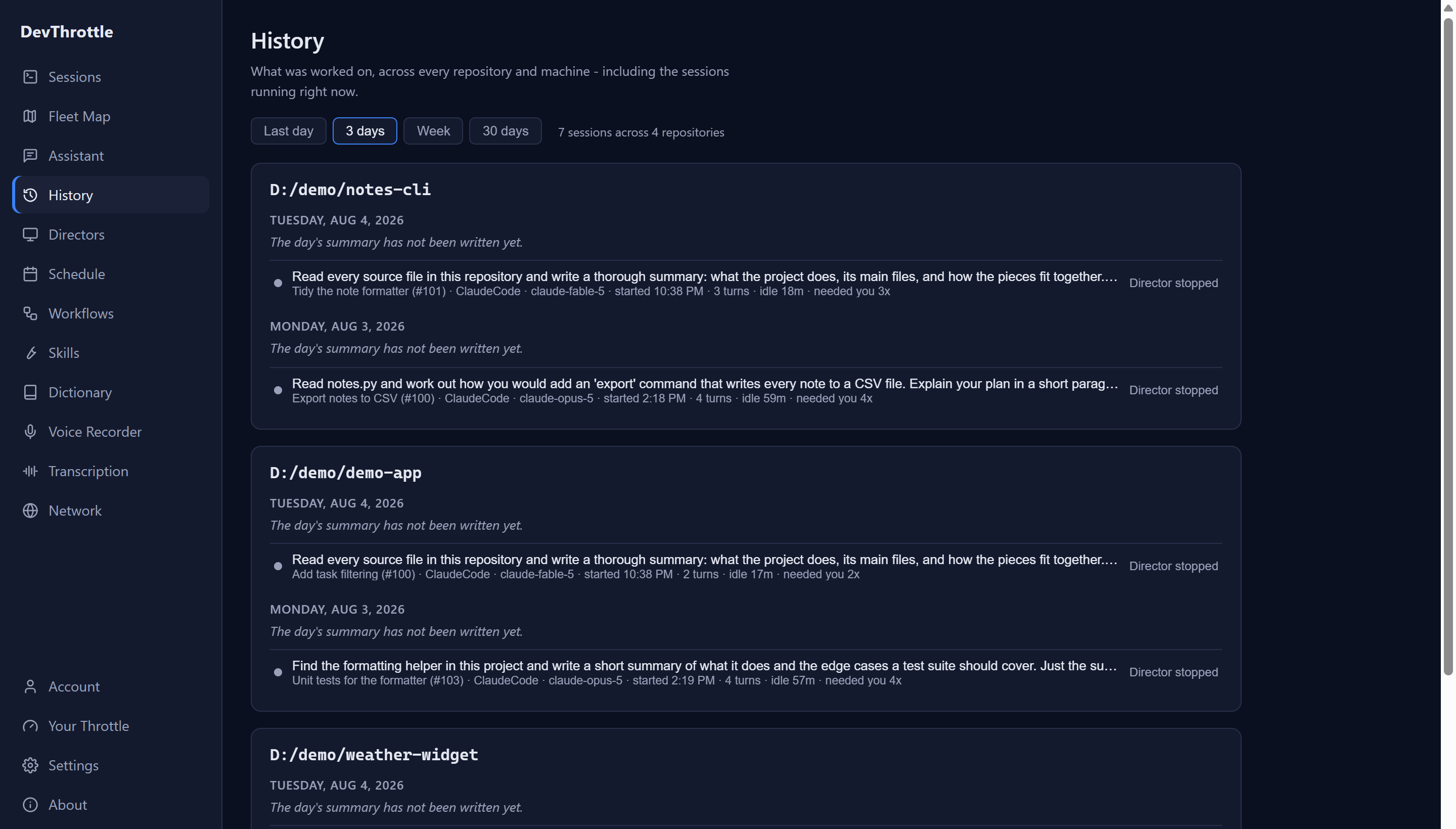
The Cockpit History page over a three day window showing seven sessions across four repositories, grouped by repository and day, each entry listing the instruction given, the session name and number, the coding agent and model, when it started, how many turns it took and how often it needed a human The line each entry leads with is filled in a fixed order: a session on a mission shows the mission, with the session's role on it; otherwise it shows the first instruction the session was given; and a session with neither falls back to its name and repository. Day to day that usually means the instruction, which is far more useful than a name - names are what you called something hopefully at the start; the instruction is what really happened.
Look at the turns and the needed-you count
Two numbers on each entry are worth more than the rest, and they read literally as 7 turns and needed you 3x. Turns counts the agent's completed turns - each stretch of work that ended with the agent stopping for input - not exchanges in some looser sense; records from older Directors fall back to counting the instructions sent in. Needed you counts how many times the session started waiting on a human.
The needed-you count is a raw tally, not a diagnosis: a real question, a permission prompt and plain finishing all enter it the same way, and the number never says why the agent stopped. Treat it as a pointer rather than proof. A job that needed you four times is usually worth reading back, because often the instruction left something open - and that habit is still the most useful thing on this page: it turns a vague sense that agents are hard work into a specific prompt worth rewriting.
Pick one thing to change
Find the entry with the worst needed-you count and read the line it leads with - if it does not show an instruction, pick the worst prompt-led entry instead. Not every high count hides a bad prompt; some of those waits were permission clicks, or the job simply finishing. But if the instruction did leave something open, rewrite it in your head to close the opening you found. That is the whole review - not a report, one improvement.
Next
History tells you what the fleet did. Your Throttle, at the bottom of the same rail, tells you how you drove it - how much you spoke versus typed, and from which surface. It shows activity, not money: agents running on your own subscriptions and keys never appear as spend on Usage. To make an agent stop needing you so often, see Steer an agent that is going wrong and Workflows, which is how a good instruction gets reused instead of retyped.